On this page
Non-Cascade position control loop
This control loop allows you to set the position/angle to your motor in real-time. This mode is enabled by:
// set angle/position motion control loop
motor.controller = MotionControlType::angle_nocascade;
This control mode is a lot less standard than the Cascaded mode which is recommended using SimpleFOClibrary The Non-cascaded mode is intended for some specific used cases where the Cascaded position control loop is not performing well.
How it works
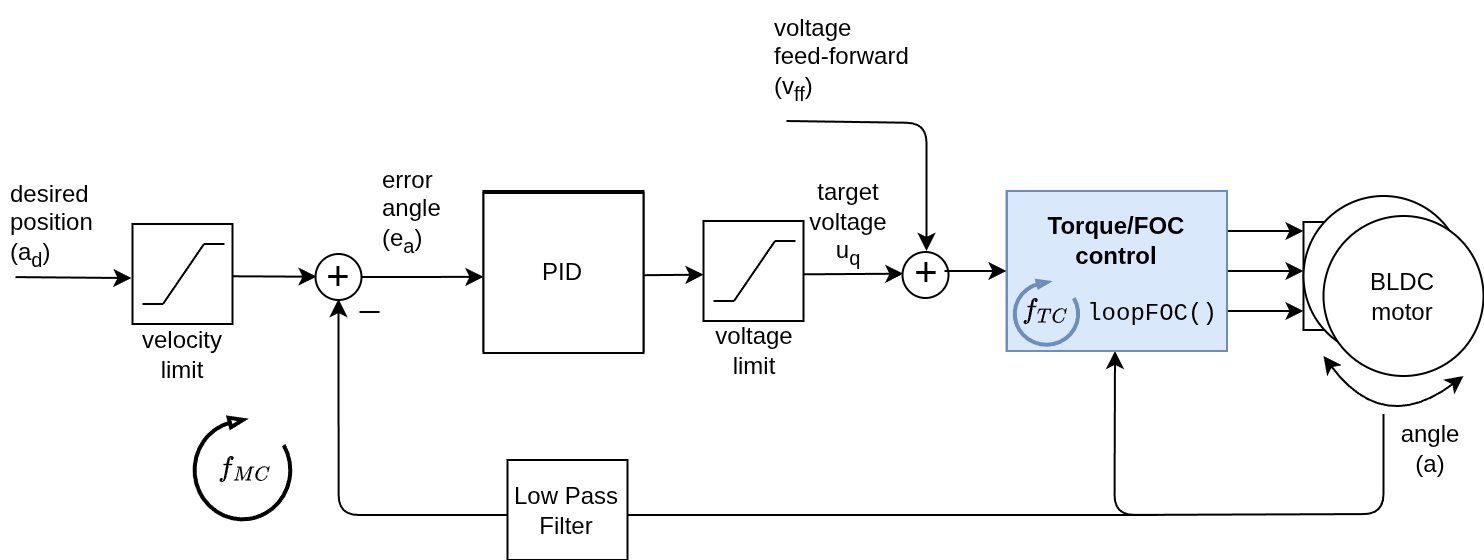
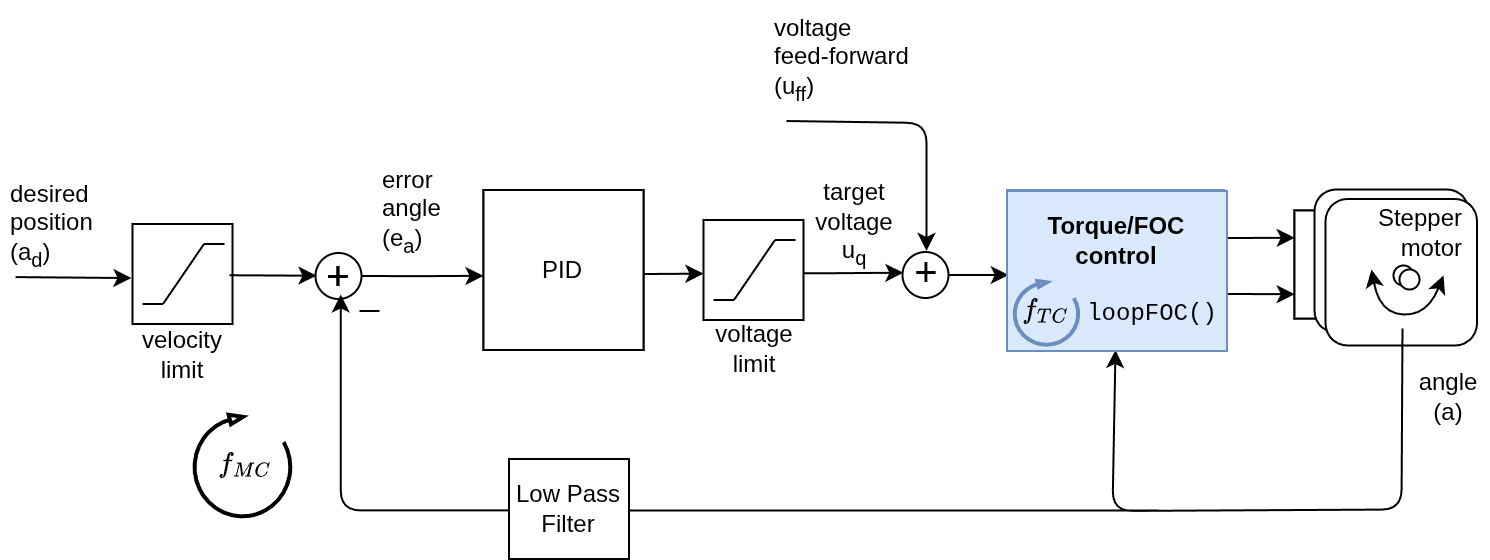
The angle/position control closes the control loop around the torque control loop directly, regardless of which one is used. If it is the voltage mode, the angle motion control will set the the torque command using the voltage \(u_q\):
And if it is any of the current torque control modes (FOC current, DC current or estimated current), the angle motion control will be setting the target current \(i_q\) to the torque controller:
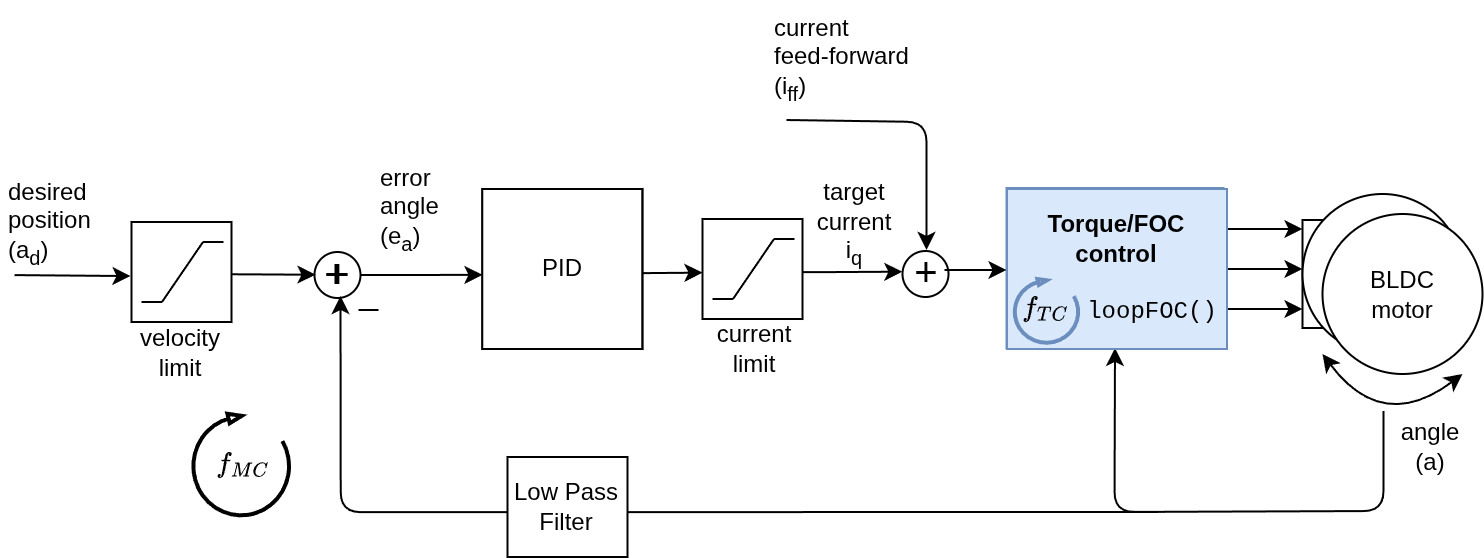
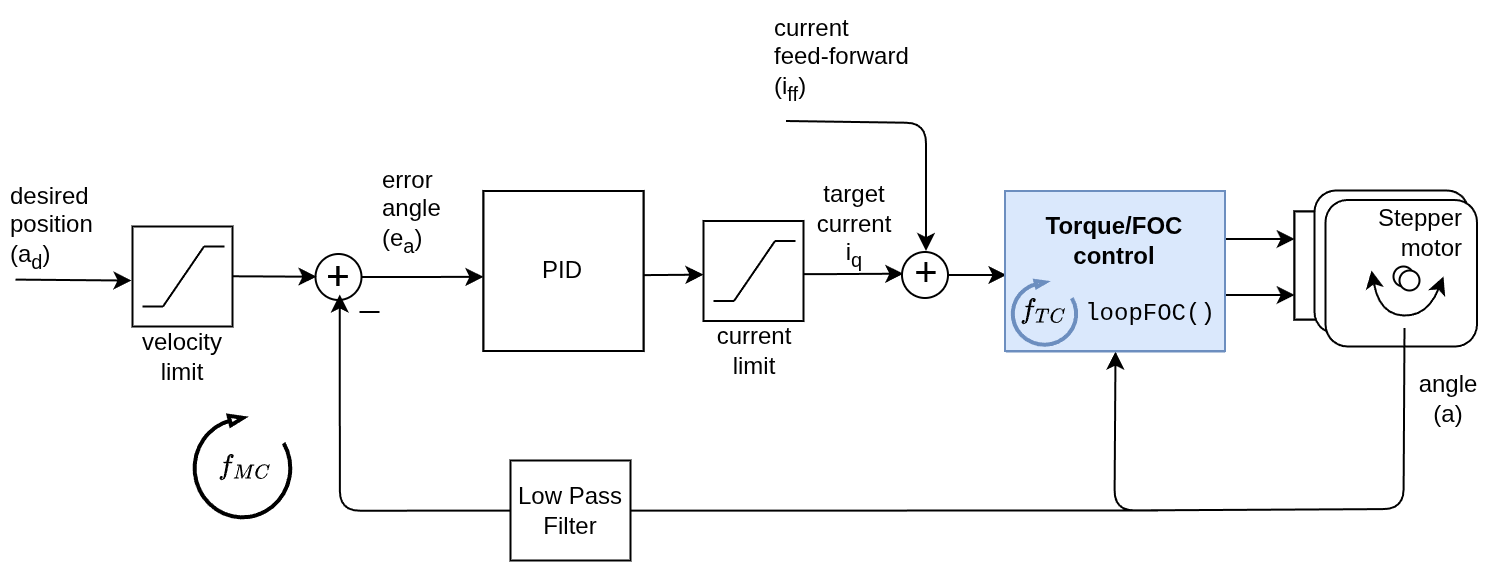
The angle control loop is therefore created by closing the control loop around the torque control loop directly. The controller reads the angle \(a\) from the motor (filters is optionally) and sets the torque target (\(u_q\) voltage or \(i_q\) current) to the torque control loop, needed to reach the velocity \(v_d\), set by the angle loop.
Control parameters
To tune this control loop, it is recommended to start from the lowest level loop (torque control) and then approach the angle loop. The parameters of the lower level loops will affect the performance of the angle control loop, so it is important to have them tuned before tuning the angle loop.
Torque loop guidance
The torque loop parameters are the same ones used in the torque control page. In many cases you will tune them once and will not need to change them again. Some torque control modes are simpler than the others, for example the voltage mode has no parameters to tune, while the FOC current mode has more parameters to tune but it can give you better performance.
Read more about torque control modes and parameters
Angle loop guidance
As opposed to the Cascaded position control loop, where the P controller is typically enough for good performance, the non-cascaded position control loop often has PD or PID structure. Tuning these gains is a bit more tricky than tuning the P gain in the cascaded structure, but there is only one controller to tune, rather that two separate loops as in the cascaded structure. Here is a quick guide to tuning the angle loop:
- Start with only all gains at zero (
P=0, I=0, D=0). - Increase
Puntil you get a responsive motion, but not too much to cause oscillations. The motor should be able to reach the target position, but it might be a bit oscillatory around it. - Then try adding a small
Dgain to dampen it, this is usually needed.
Example parameters for the angle loop:
// angle PID controller
motor.P_angle.P = 10; // default P=20
motor.P_angle.D = 0.1; // default D=0
Special case: Noisy sensor
- If you still have oscilations try filtering the angle input with
Tfparameter, staring with a small value like0.001and increasing it until the oscilations are reduced.
// angle low-pass filter
motor.LPF_angle.Tf = 0.001; // default Tf=0
Special case: Steady-state error due to gravitational loads
- If the motor has a steady-state error, for example if the motor lifts a weight of some kind, then the PD controller will not be able to compensate for it and you will need to add some
Igain to compensate for the steady-state error. Start with a smallIgain like0.1and increase it until the steady-state error is reduced.
motor.P_angle.I = 0.0; // default I=0
Additional Advanced Parameters
The PID gains are the most important parameters to tune and the ones that will have the biggest impact on the performance of the position control loop. Apart from the PID gains, there are several other parameters that can be set for specific use cases.
-
Output Ramp: This is a rate limiter variable. The parameter limits how quickly the PID controller’s output can change. In the non-cascade mode, this directly limits how fast the current or voltage can be applied to the motor. It is measured in Volts/Amps per second (\(\frac{V}{s}\) or \(\frac{A}{s}\)). Setting it to
0disables this limit. -
Limit: This parameter restricts the PID controller’s output (target current or voltage). Setting it to
NOT_SETremoves the limit. -
Sampling Time: This sets the PID controller’s sampling time in seconds [s]. The default is
NOT_SET, allowing the PID to calculate the sampling time based on the time between calls.
Motion control frequency
By default, the motion control loop runs at the same frequency \(f_{MC}\) as the torque control loop \(f_{TC}\), which is typically around 1-10 kHz. However, in some cases, you may want to run the motion control loop at a lower frequency than the torque control loop. In that case you can use the motion_downsample parameter of the motor.
For example, setting motion_downsample to 10 will run the velocity control loop at 100 Hz while the torque control loop runs at 1 kHz:
motor.motion_downsample = 10; // run velocity loop at 10 times lower frequency than torque loop
In other words, the velocity control loop will run at a frequency of \(f_{MC} = \frac{f_{TC}}{\texttt{motion_downsample}}\), meaning that the motor.move() function will be called every motion_downsample number of motor.loopFOC() calls.
Control parameters overview
| Parameter | Variable | Description | Default Value | Unit |
|---|---|---|---|---|
Angle P | motor.P_angle.P | Responsiveness of position control. | 20.0 | \(\frac{V}{rad}\) or \(\frac{A}{rad}\) |
Angle I | motor.P_angle.I | Integral correction for position. | 0.0 | \(\frac{V}{rad\cdot s}\) or \(\frac{A}{rad\cdot s}\) |
Angle D | motor.P_angle.D | Damping for position control. | 0.0 | \(\frac{Vs}{rad}\) or \(\frac{As}{rad}\) |
Angle filter Tf | motor.LPF_angle.Tf | Low-pass filtering of angle. | 0.0 | \(s\) |
| Angle output ramp | motor.P_angle.output_ramp | Rate limiter on output. | NOT_SET | \(\frac{V}{s}\) or \(\frac{A}{s}\) |
| Angle limit | motor.P_angle.limit | Max output magnitude. | NOT_SET | \(V\) or \(A\) |
| Motion downsampling | motor.motion_downsample | Run motion control loop at lower frequency than torque control loop. | 0 | - |
For more theory about this approach and the source code documentation check the digging deeper section.
Dig deeper into motion control theory
Velocity & Torque Limits
The non-cascaded position control loop does not allow for limiting the velocity of the motor. However, it allows for directly limiting the torque (current or voltage) applied. The torque limit allows to decide how aggressive/backdrivable the position control loop will be, and it can be set by setting the current or voltage limit of the motor:
// setting the limits
// either current
motor.updateCurrentLimit(2); // Amps
// or voltage
motor.updateVoltageLimit(10); // Volts
Target & Feed-forward terms
The position control loop uses the target angle as its main reference. You can set or update it at runtime:
// set target angle (radians)
motor.target = 1.57; // ~90 deg
Position/angle units
The units of the
motor.targetvariable in angle control modes are radians \(rad\). If you want to use different units, like turns or degrees, you will need to convert them accordingly.
The non-cascade controller also supports a feed-forward term to improve tracking:
| Term | Variable | Description | Unit |
|---|---|---|---|
| Target angle | motor.target | Target angle for the position controller. | \(rad\) |
| Current feed-forward | motor.feed_forward_current | Adds a constant current to the motor (current-based torque modes). | \(A\) |
| Voltage feed-forward | motor.feed_forward_voltage | Adds a constant voltage to the motor (voltage or current modes). | \(V\) |
// current feed-forward
motor.feed_forward_current.q = 0.5;  // A
// voltage feed-forward
motor.feed_forward_voltage.q = 1.0;  // V
Be careful with feed-forward terms
The feed-forward terms can be very useful for improving the performance of the control loop, but they can also cause instability if not used carefully. They are intended for advanced users who have a good understanding of the system and the control loop. If you are not sure about how to use them, it is recommended not to use them.
Position control example code
This is a very basic example of the position motion control program with non-cascaded paradigm. The torque control mode is voltage. When running this code the motor will move in between angles -1 RAD and 1 RAD each 1 sec.
#include <SimpleFOC.h>

// motor instance
BLDCMotor motor = BLDCMotor(11);
// driver instance
BLDCDriver3PWM driver = BLDCDriver3PWM(9, 10, 11, 8);

// encoder instance
Encoder encoder = Encoder(2, 3, 500);
// channel A and B callbacks
void doA(){encoder.handleA();}
void doB(){encoder.handleB();}

void setup() {

  // initialize encoder sensor hardware
  encoder.init();
  encoder.enableInterrupts(doA, doB);
  // link the motor to the sensor
  motor.linkSensor(&encoder);

  // driver config
  driver.voltage_power_supply = 12;
  driver.init();
  motor.linkDriver(&driver);

  // set motion control loop to be used
  motor.controller = MotionControlType::angle_nocascade;
  // set the torque control mode to voltage mode
  motor.torque_controller = TorqueControlType::voltage;

  // controller configuration based on the control type
  // velocity PID controller parameters
  // default P=0.5 I = 10 D =0
  motor.P_angle.P = 0.2;
  motor.P_angle.D = 0.001;
  motor.P_angle.I = 0;

  motor.LPF_angle.Tf = 0.005; // angle low-pass filter

  motor.updateVoltageLimit(6); // limit voltage to 6V for more gentle motion

  // use monitoring with serial
  Serial.begin(115200);
  // comment out if not needed
  motor.useMonitoring(Serial);

  // initialize motor
  motor.init();
  // align encoder and start FOC
  motor.initFOC();


  Serial.println("Motor ready.");
  _delay(1000);
}

// angle set point variable
float target_angle = 1;
// timestamp for changing direction
long timestamp_us = _micros();

void loop() {

  // each one second
  if(_micros() - timestamp_us > 1e6) {
      timestamp_us = _micros();
      // inverse angle
      target_angle = -target_angle;
  }

  // main FOC algorithm function
  motor.loopFOC();

  // Motion control function
  motor.move(target_angle);
}
Project examples
Here is one project example which uses position control and describes the full hardware + software setup needed.
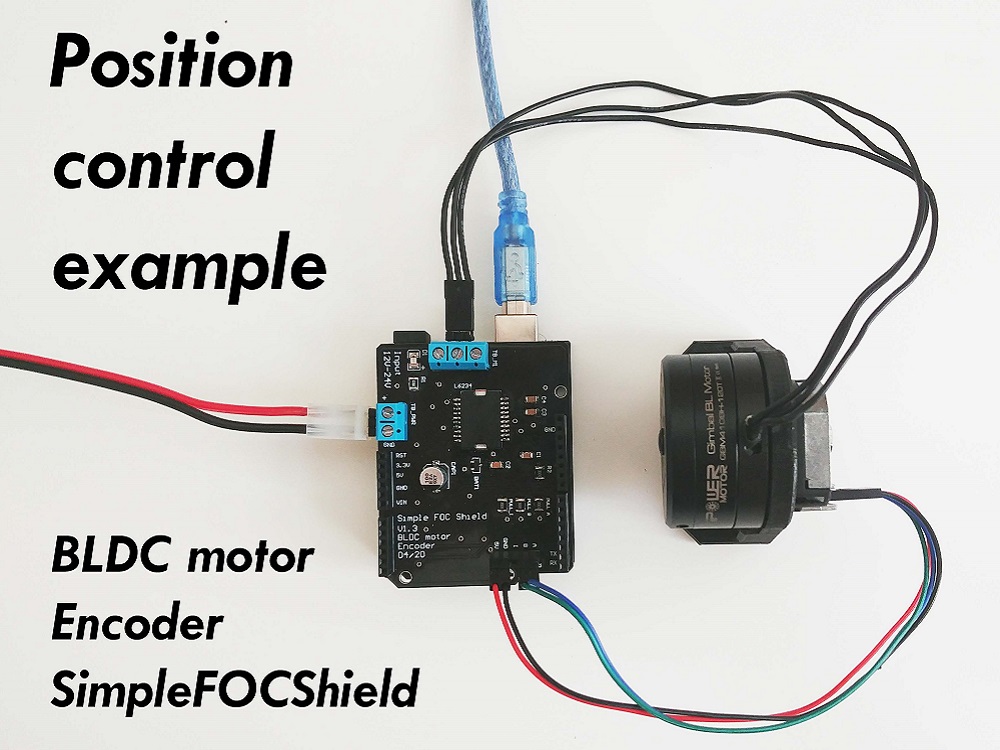
Find more projects in the example projects section.