On this page
Microspora firmware and pinout reference
Programming the board in DFU mode
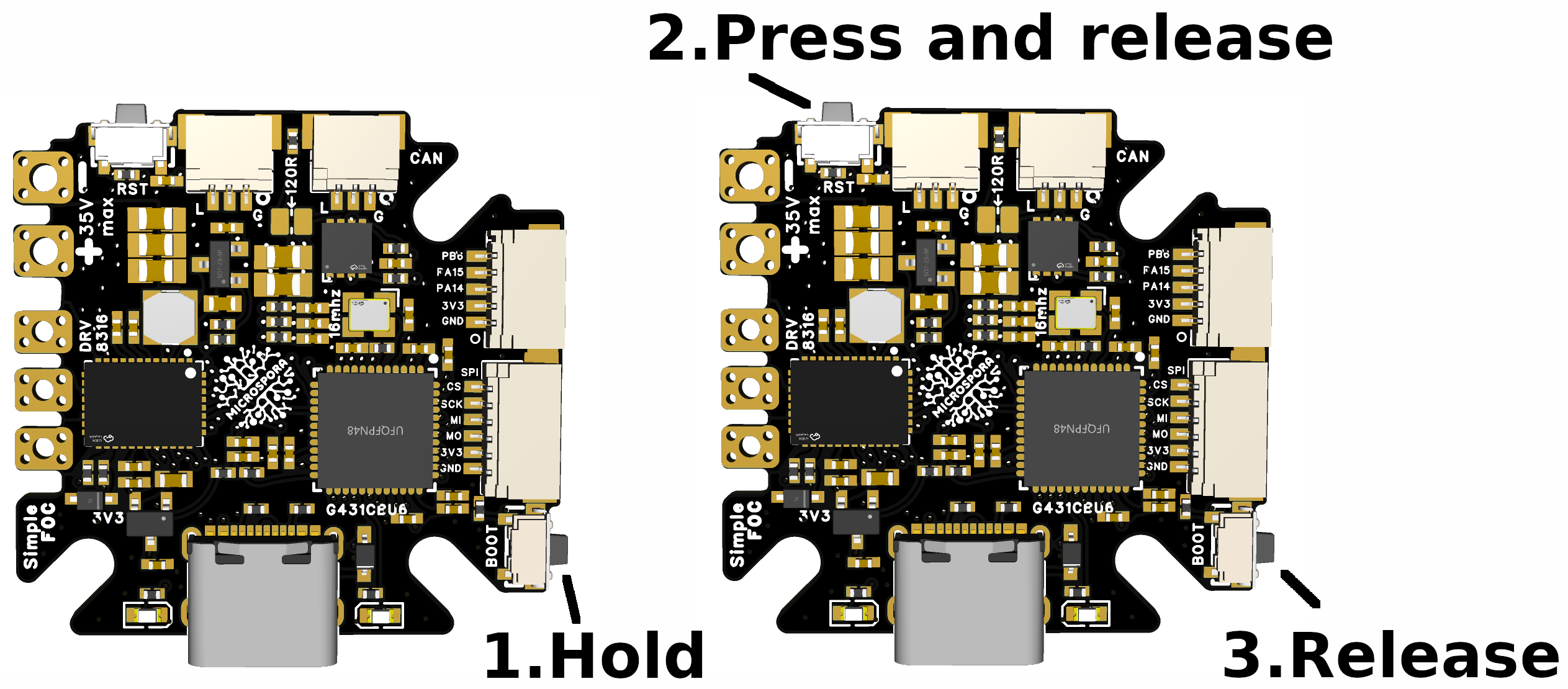
The board firmware can be built with PlatformIO and or Arduino IDE. But in order to flash the firmware the board needs to be in the DFU mode. To do so follow these steps:
- Connect the board to the computer using USB-C.
- Enter DFU mode: hold BOOT, press and release RESET, wait one or two seconds, then release BOOT.
- Upload the firmware from PlatformIO.
An example firmware for the Microspora board can be found in the Microspora firmware repository. The reference firmware runs the FOC loop from a 10kHz hardware-timer interrupt. Serial monitoring uses 250000 baud. The board also exposes the SimpleFOC Commander interface and optional SimpleFOC CAN communication.
See the board detailed pinout here
Work in progress
The full documentation is still being expanded, but the project is already designed for use with the SimpleFOC ecosystem and supports the core features needed for compact low-power BLDC control.
For now, you can follow the discussions on the SimpleFOC community forum or the project Discord server for updates and usage tips.